> ## Documentation Index
> Fetch the complete documentation index at: https://docs.gmicloud.ai/llms.txt
> Use this file to discover all available pages before exploring further.
# GPU Compute
> Run GPU workloads on GMI Cloud: managed Kubernetes clusters, container instances, or dedicated bare-metal servers.
Run GPU workloads on GMI Cloud. Pick the format that fits your job: a managed Kubernetes cluster for training, a container instance for short jobs and notebooks, or a dedicated bare-metal server for full hardware control.
 ## What you can do here
Production-ready Kubernetes clusters with H200 or B200 nodes, provisioned and operated by GMI.
Spin up single containers from a template (vLLM, SGLang, JupyterLab, custom images) on demand.
Dedicated hosts when you need full OS access, custom drivers, or persistent local NVMe.
Configure firewalls and Elastic IPs for any compute resource you provision.
## How requests work
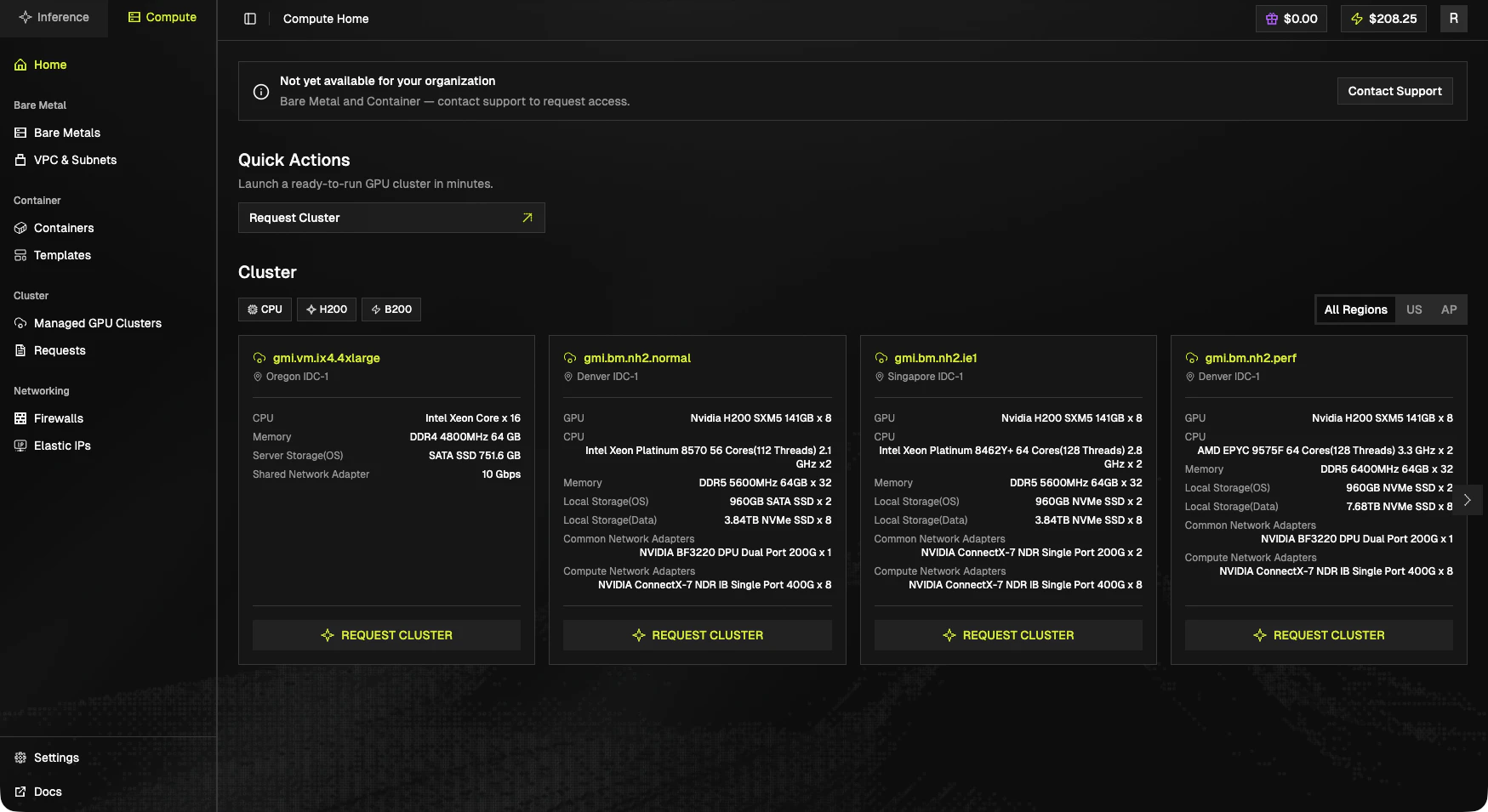
1. Browse the cluster catalog in the console. Each card lists the SKU, region, and full hardware spec.
2. Click **Request Cluster** on the card you want. The form is pre-filled with that SKU and region.
3. GMI support reviews the request and provisions the resources.
4. Once ready, the cluster appears under [Managed GPU Clusters](/cluster-engine/resources/managed-gpu-clusters) and you can start using it.
Track the status of in-flight requests on the [Cluster Requests](/cluster-engine/resources/cluster-requests) page.
## Pricing
Prices vary by SKU, GPU type, and region. The catalog cards in the console always show the current rate for each option, and the full live pricing list is on the [Pricing page](/inference-engine/billing/price).
## Product entitlements
Bare Metal and Container access is gated per organization. If those sections show a "Not yet available" banner, click **Contact Support** from the console to request access.
## What you can do here
Production-ready Kubernetes clusters with H200 or B200 nodes, provisioned and operated by GMI.
Spin up single containers from a template (vLLM, SGLang, JupyterLab, custom images) on demand.
Dedicated hosts when you need full OS access, custom drivers, or persistent local NVMe.
Configure firewalls and Elastic IPs for any compute resource you provision.
## How requests work
1. Browse the cluster catalog in the console. Each card lists the SKU, region, and full hardware spec.
2. Click **Request Cluster** on the card you want. The form is pre-filled with that SKU and region.
3. GMI support reviews the request and provisions the resources.
4. Once ready, the cluster appears under [Managed GPU Clusters](/cluster-engine/resources/managed-gpu-clusters) and you can start using it.
Track the status of in-flight requests on the [Cluster Requests](/cluster-engine/resources/cluster-requests) page.
## Pricing
Prices vary by SKU, GPU type, and region. The catalog cards in the console always show the current rate for each option, and the full live pricing list is on the [Pricing page](/inference-engine/billing/price).
## Product entitlements
Bare Metal and Container access is gated per organization. If those sections show a "Not yet available" banner, click **Contact Support** from the console to request access.